Universal Live Timing for 40+ series

Live timing.
Live lights.

One app for every series you watch. TrackGlow turns the live timing of 40+ championships into one clean, fast timing screen with more data than the official pages, and makes your RGB lights react to every flag, safety car and pit stop in real time.

Free download · Windows 10 and 11 · Live Timing with Pro

Try the lights
TrackGlow Live
GREEN FLAG Delay behind live 1.5 s

01 Universal Live Timing

Every series.
One live timing.

No more hunting for a different, clunky timing page for every championship. TrackGlow reads the live timing of 40+ series and shows it all in one fast, clean window, then adds what the official pages don't have: race traces, lap charts, strategy and pit-stop predictions, worked out live by TrackGlow itself.

Race trace

See who's really fast.

Every lap of every car against the class average. Pit stops and safety-car periods are marked, so you can spot who is quick, who is fading and who is saving fuel.

Lap chart

The whole race at a glance.

Positions at the end of every lap from the starting grid. Click a name to follow one car through the stops, the overtakes and the full course yellows.

Strategy & pit-stop prediction

What if they pit now?

Click any driver for their race at a glance: cars ahead and behind, lap times and positions as charts, tyres and stints. TrackGlow also predicts where they would rejoin if they pitted right now, under green, VSC and safety car, and who they would come out behind.

  • Pit losses learned from the real stops in this race
  • Stint and tyre history for every car
  • Follow a driver or team with one click, and your lights react to them
  • One layout for every seriesFrom F1 to Formula DRIFT, with layouts made for each kind of racing: multiclass endurance, single-seaters, bikes and drift battles.
  • Sectors & speed trapsPurple and green sectors, best sector times and speed traps, wherever the series sends them.
  • Multiclass done rightFilter by class, gaps to the class leader, class bests and class positions.
  • Track & weatherTime left, leader lap, air and track temperature, humidity and wind.
  • Predicted championshipDrivers and teams as if the race ended now, when the series shares the data.
  • Synced to your streamPin the window on top and set your stream delay, so nothing is spoiled before you see it.

02 Lights

Lights out and away we go.

The other half of TrackGlow: your PC's RGB and smart lights play every flag and race event. Three steps, about two minutes, with a short first-run setup.

  1. 1

    Pick your series

    Choose from 40+ championships, from F1 and IMSA to BTCC, MotoGP and Formula DRIFT. Star your favourites and TrackGlow can switch to whichever one goes live.

  2. 2

    TrackGlow reads the live timing

    It follows the session on its own: practice, qualifying and race. Flags, safety cars, pit stops, fastest laps and more arrive the second they're announced.

  3. 3

    Your lights react

    Every LED you own plays the matching animation, timed to your stream delay so the lights change exactly when the flag appears on your screen.

Flags & race events

Every flag. Every moment.

Green, yellow, safety car, virtual safety car, red and the chequered flag, plus race events: race start, lead change, final lap, penalties, retirements, purple sectors, rain, pit stops and fastest laps.

  • Classic animations that are tuned for racing out of the box
  • Give any flag or event its own effect, colours and speed
  • Target areas: just the keyboard, the fans, the left side of your desk
TrackGlowPatterns
Pattern Studio · Pro

Design your own light show.

Stack effects on a timeline like a video editor: 48 effects, blend modes, fades, loops and targets. Write text across your keyboard, even live data like your driver's position or the gap to the leader. Watch it on your real lights while you edit.

  • Layers, loop region, fade in and out per clip
  • Pixel-font text with live race data
  • Use any pattern for any flag or event
TrackGlowPROPattern Studio
Workshop

Share it with the paddock.

Browse ready-made and community patterns, rated and tagged, and preview them on your own lights. Install a whole collection with a pattern for every event in one click, and go back to your own set any time.

  • Browse, install and preview for free
  • Upload, remix and share collections with Pro
  • "On your setup" shows where each layer plays on your PC
TrackGlowWorkshop

Sync with your stream

Watching on a delay? Press "I see it now" when a flag shows on your TV and your lights line up with the picture.

LED Setup

Place every device where it really sits on your desk, so sweeps and waves flow across your whole setup.

Formation Lap

A short first-run setup finds your lights, installs OpenRGB if you need it and picks your favourite series.

Lights it drives

Light up the whole room.

Your PC's RGB through OpenRGB, plus the smart lights around it, all playing the same flag at the same time.

Main output

OpenRGB

The free tool that controls RGB from almost every brand. TrackGlow drives everything it sees:

  • Keyboards
  • Mice
  • Case fans
  • RAM
  • LED strips
  • Motherboards
  • Graphics cards
  • Coolers
  • Headset stands

WLED

Every LED on your WLED strips and matrices, mapped across your layout.

Philips Hue

Each lamp gets its own colour from your layout, left to right.

Govee

Over your home network with LAN Control. No cloud needed.

Nanoleaf

Panels light up one by one, and your own effect comes back when you're done.

MQTT & Home Assistant

Send the flag and colour to Home Assistant or anything that speaks MQTT.

Webhooks

Post every flag change to your own automations and tools.

03 Schedule

Never miss lights out.

Every qualifying, sprint and race of every supported series in one calendar, and TrackGlow ready to go when they start.

Race schedule

Every session, your time zone.

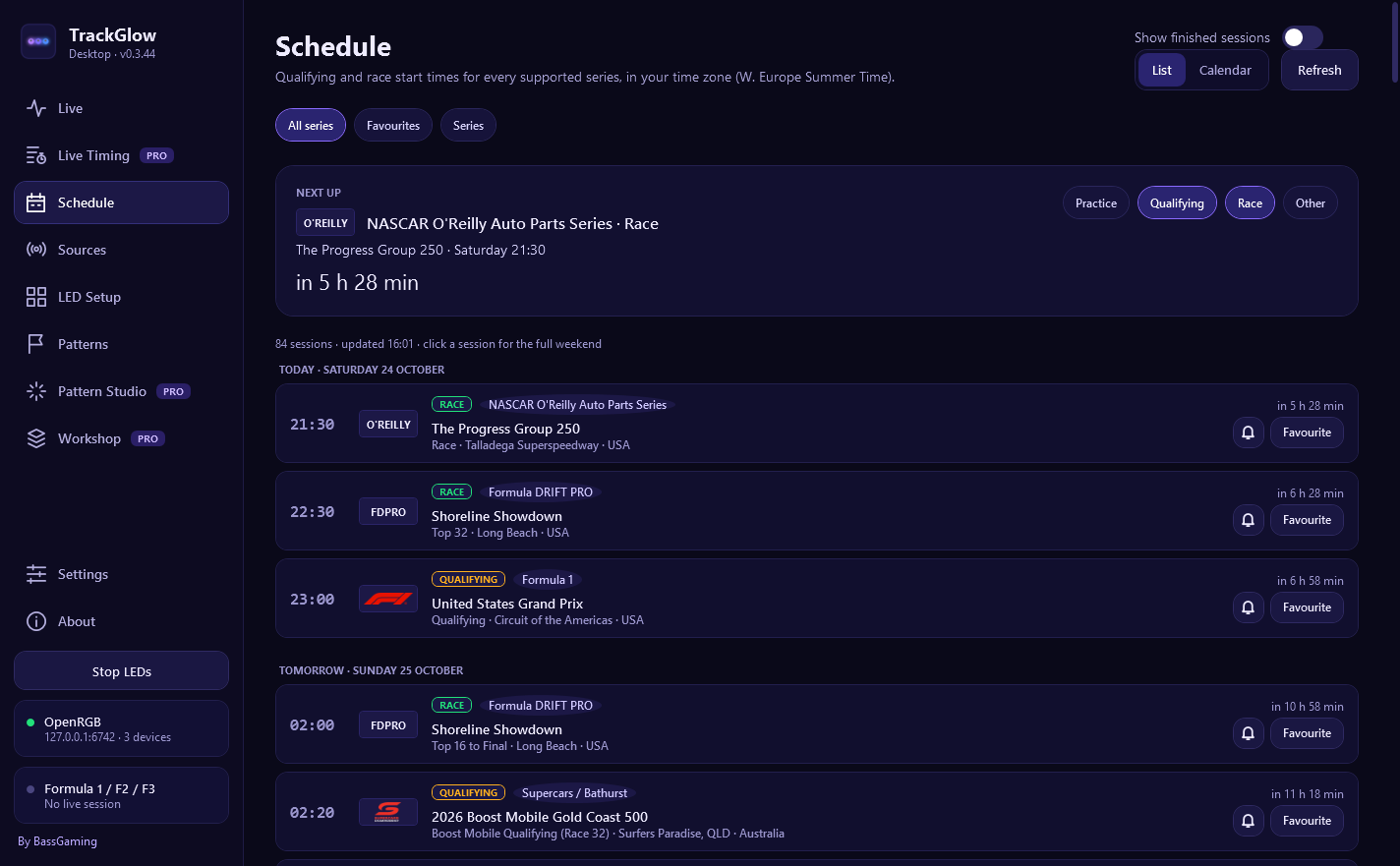
Qualifying, sprints and races of every supported series in your own time zone, with countdowns and a "live now" marker. Set a reminder, star the series you care about, or open the month calendar to plan your weekend.

  • Whole weekend timetables, practice included
  • Reminders before the sessions you pick
  • Auto-follow: TrackGlow switches to a starred series when it goes live
TrackGlowSchedule
The TrackGlow Schedule with upcoming sessions, countdowns and reminders

Auto-follow what's live

Star your series and TrackGlow switches to whichever one goes live, so the lights are always on the right race.

Updates itself

New series and fixes arrive automatically. One click installs them and TrackGlow restarts on the newest version.

Quiet in the tray

Close the window and TrackGlow keeps running in the tray. Start it with Windows and forget about it.

04 Supported series

40+ championships. One app.

Cars, bikes, karts and drifting, across five continents. New series arrive with updates.

Single-seaters

  • Formula 1 / F2 / F3
  • Formula E
  • IndyCar
  • Super Formula
  • Super Formula Lights
  • Formula Regional Japan
  • Eurocup-3 / F4 Spain
  • British F4

Endurance & sports cars

  • WEC
  • IMSA
  • ELMS
  • Asian Le Mans Series
  • Ligier European Series
  • Michelin Le Mans Cup
  • GT World Challenge Asia
  • Ferrari Challenge
  • HSR Historic

Touring & GT

  • DTM
  • ADAC GT Masters
  • ADAC GT4 Germany
  • Porsche Carrera Cup Deutschland
  • BMW M2 Cup
  • BTCC
  • British GT
  • Porsche Carrera Cup GB
  • Porsche Sprint Challenge GB
  • MINI Challenge UK

Stock cars & Down Under

  • NASCAR
  • Supercars / Bathurst
  • Australia & NZ racing

UK club racing

  • Any live TSL Timing event

Bikes

  • MotoGP / Moto2 / Moto3
  • WorldSBK
  • WorldSSP
  • British Superbikes

Karting & drifting

  • Formula DRIFT PRO
  • Formula DRIFT PROSPEC
  • AUTOBACS GPR Karting
  • All Japan Kart
  • ROTAX MAX Japan

What each series sends depends on its free live timing: some only report flags during sessions, and a few have no yellow or safety-car flags. The app shows what's available for each one.

05 Pricing · Free vs Pro

Free to race. Pro to create.

The app, every series and the flag animations are free, forever. Pro unlocks the creative side and keeps TrackGlow on track.

Free

€0free forever

Everything you need for live flags on race day.

  • Every supported series
  • All lights: OpenRGB, WLED, Hue, Govee, Nanoleaf, MQTT, webhooks
  • Classic flag and race-event animations
  • Solid, Breathe, Flash and Chase effects
  • Follow your driver or team
  • Stream delay sync
  • Race schedule, reminders and auto-follow
  • Browse, install and preview Workshop patterns
  • Try the Pattern Studio
Download free
Support the project

Pro

3 €/ month · or $3, depending on where you live

Everything in Free, plus universal Live Timing and the full creative toolkit.

  • Universal Live Timing for every series
  • Race trace, lap chart, strategy and pit-stop prediction
  • The full effect library and custom patterns for any flag or event
  • Pattern Studio: save, import, export and play on your lights
  • Display Patterns that stay on over everything
  • Use Workshop patterns, upload your own and share collections
  • Rate patterns in the Workshop
  • Works on up to three PCs
Get Pro on Patreon

Billed through Patreon, cancel any time. Sign in with Patreon inside the app, no keys to copy. Pro goes straight to BassGaming and keeps TrackGlow growing.

06 FAQ

Questions from the pit wall.

Does TrackGlow work on Mac or Linux?

No, TrackGlow is a Windows app (Windows 10 and 11).

Do I need OpenRGB?

For your PC's RGB (keyboard, mouse, fans, RAM, strips and so on), yes. OpenRGB is free and TrackGlow can download and set it up for you. If you only use smart lights like WLED, Hue, Govee or Nanoleaf, you don't need it.

My lights flicker or ignore TrackGlow. What's wrong?

Your brand's own RGB software (iCUE, Armoury Crate, Mystic Light, Synapse, G HUB and similar) is probably fighting OpenRGB over the same lights. Close it while TrackGlow runs. TrackGlow tells you when it spots one of these programs.

Why don't my lights react during practice?

Some series only send flags during certain sessions, and some free timing feeds don't include every flag (for example local yellows). TrackGlow uses whatever each series makes public, and the Sources page shows what you get for each one.

Which series have Live Timing?

All of them. Live Timing uses the same timing data TrackGlow already reads for your lights, so it works for every supported series. How much detail you see (sectors, speed traps, weather, tyres) depends on what each series makes public.

Is Formula 1 free?

F2 and F3 work with their free live timing. Formula 1 needs an F1 TV subscription, read through the MultiViewer app or your F1 TV account. All other series use free public timing.

My lights change before I see the flag on TV.

Your stream is behind the live timing. Set the delay on the Live page, or press "I see it now" the moment a flag appears on screen and TrackGlow lines everything up.

How does Pro work?

Join the Pro tier on Patreon (3 € or $3 a month) and sign in with Patreon inside TrackGlow, or redeem a Pro key. Pro works on up to three PCs and checks in online about every two weeks.

Who makes TrackGlow?

TrackGlow is designed, built and maintained by BassGaming, a solo developer working on it in their free time. Every Pro membership on Patreon directly supports that work.

Was AI used to make this app?

Yes, absolutely. TrackGlow is an idea I carried around for years: one live timing for every series, and lights that react to every flag, full immersion. Nothing like it existed before. As a solo hobby developer with a full time job, the real choice was between building it with AI as a coding assistant or never building it at all. AI is what finally allowed me to turn the idea into a working app, and I'm glad it did.

A series stopped working. What happened?

Series and timing providers sometimes change their systems or stop sharing certain data, often without notice. Fixes usually arrive as an update within a short time. You can always report it at support@trackglow.net.

Is TrackGlow official?

No. TrackGlow is an independent fan project and is not affiliated with any racing series, team or timing provider.
Still stuck? Email support@trackglow.net

Ready for lights out?

Download TrackGlow free and see your setup come alive at the next race.